

21 October 2026
Make a Halloween Junk Journal Spread with Free Printable Papers and Ephemera
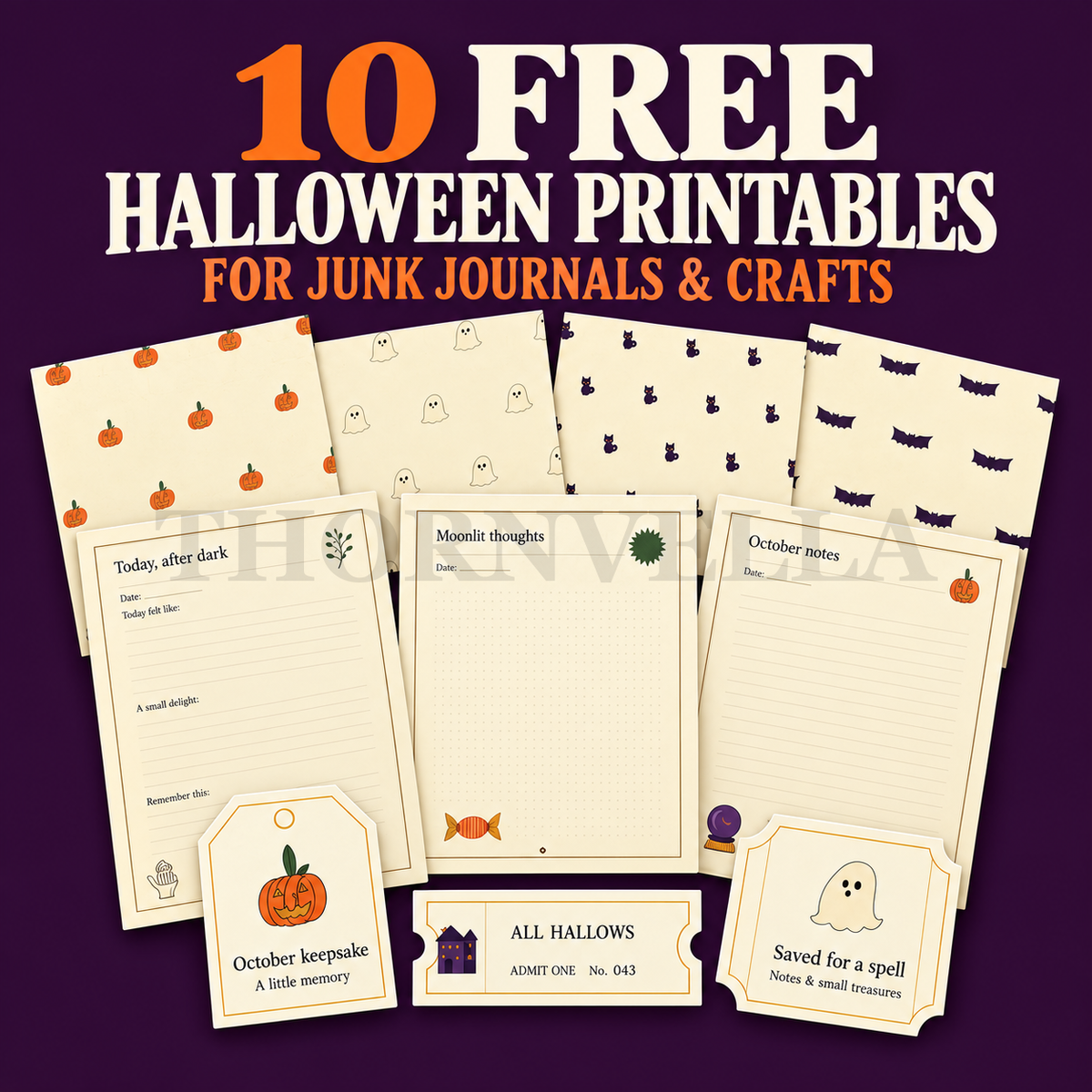
DIY: Make your Halloween junk journal spread
A Halloween junk journal spread is a good excuse to bring together patterned paper, curious little illustrations and a place for a handwritten memory. You do not need to use everything on the page. A background, a quieter writing area and one pocket can make a complete project.
Start with 10 free PNG printables: 4 patterned papers, 3 journaling pages and 3 ephemera pieces.

If this journal will be a present, choose its finishing details now. Our 2 free Halloween cards + 2 matching gift tags shows how to print a card and tag to accompany it.
Gather your supplies
- A journal, notebook or folded paper base.
- The downloaded digital files and a computer for extracting the archives.
- A printer, suitable paper, scissors or a trimmer, and a ruler.
- A glue stick or appropriate paper adhesive, plus optional cardstock for tags.
Make your spread in 5 steps

1. Download, extract and find your designs
For the free starter pack, unzip the ZIP to find all ten PNG images. For the full purchased collection, use the Google Drive link in your order’s access PDF to download the complete 01 Buyer Downloads Halloween 5300 Expanded.rar archive, then extract it into a new, empty folder.
2. Print the correct page size
For the free PNG files, the papers and journaling pages are A4; the ephemera pieces keep their original print dimensions. Open each image in your usual print app, check the preview and select Actual size / 100% to preserve those dimensions. If you have the full collection, choose an A4, A5 or US Letter print PDF that matches your paper. Make one proof first, especially if you plan to print dark backgrounds. For tags that need more strength, use suitable cardstock within your printer's paper-weight limit.
3. Cut and arrange the layers without glue
Trim a piece of the free bat-patterned paper to fit your journal page. Cut a smaller writing panel from the “Today, after dark” page and lay it over the pattern, leaving a visible border. Try the pumpkin tag, haunted-house ticket and ghost pocket in different positions, without using glue. Keep the pocket’s top clear for the tag, and open and close the journal to check that everything fits within the page edges and stays clear of the fold.

For an apothecary theme, take colour and motif inspiration from the potion-bottle label project. Keep bottle decorations separate from the paper pages.
4. Add a simple paper pocket
Use the free ghost pocket labelled “Saved for a spell”. Cut around the solid outer line, keeping both side tabs and the bottom tab. Lightly score the three dashed lines, then fold those tabs behind the printed front.

Glue your background and writing panel in place once you are happy with the layout. Apply a thin layer of glue to the outward-facing surfaces of the three folded pocket tabs, then press the pocket onto the page. Leave the top and centre unglued. Let the glue dry before sliding the pumpkin tag into the opening.

5. Finish with a handwritten detail
Add the date, a short Halloween memory, a favourite seasonal book title or plans for your next craft. A blank area is useful: it makes the spread a journal page you can return to, rather than just a display of paper pieces.
Using seamless papers in a larger project
For a digitally repeated pattern, repeat the complete tile at the same scale and orientation. Cropping an edge or adding a margin between tiles breaks the seamless join. For this journal project, you can simply print the supplied paper page and trim a section to fit.
Carry your favourite palette into the room around your craft table with our dark botanical gallery-wall guide or the gothic printable display tutorial.
Related printables for your Halloween craft table
The Potion Labels collection can add an apothecary accent to a journal cover or decorative jar. For gifts made from your craft session, explore Morbid Halloween Cards & Gift Tags. If you want the Halloween creative files, potion labels and stream overlays together, see the Halloween Creator Vault and compare its contents with anything you already own.
Do I need design software?
No. You can print the free PNG images using your usual image viewer or print app. For the full collection, supplied print PDFs are another simple option. Editing SVG or layered PSD files needs compatible software. These are digital downloads; no journal, printed pages, scissors or adhesive are supplied.
Choose your next Thornvella project
Download 10 free Halloween printables
Try 4 patterned papers, 3 journaling pages and 3 ephemera pieces. The exact ten designs shown below are included in the free starter download.

Download your 10 free printables (ZIP)
Free download: 10 PNG image files only. The papers and journaling pages are A4; the ephemera pieces retain their original print dimensions. Print at Actual size / 100% and test one sheet first.
Want more variety? Buy the full pack
5,300 designs: 5,000 illustrations across 50 subject categories, plus 100 seamless papers, 100 journaling pages and 100 ephemera designs. Includes editable SVG artwork, PNG images, print PDFs and selected layered PSD files.
You might also want to check out
- 2 free Halloween cards + 2 matching gift tags
- How to Make a Dark Botanical Gallery Wall with FREE Printable Art
- potion-bottle label project
- gothic printable display tutorial
This would go well with your project
- Potion Labels Mega Bundle — Add a labelled decorative bottle to a handmade gift.
Get your free files and choose more designs
Download your 10 free printables (ZIP)
Download the ZIP to your computer and extract it before opening the original files. Blog preview watermarks are not intended for printing.